


 223
223
Dell Pro 16 (PC16250)
Contents
Features of the Dell Pro 16 (PC16250)
Touchpad Gestures (Windows Precision Touchpad)
Keyboard Shortcut Highlights (Fn Key)
Full Keyboard Shortcuts for the Dell Pro 16 (PC16250)
Features of the Dell Pro 16 (PC16250)
Performance & AI
- Powered by Intel Core Ultra processors with an integrated Neural Processing Unit (NPU).
- Designed to handle AI-driven workloads and enhance productivity through intelligent task optimization.
- Includes a dedicated Microsoft Copilot key for quick access to AI-powered assistance.
Design & Durability
- Premium, rigid aluminum chassis built for professional environments.
- Engineered for durability while maintaining a sleek, modern design.
Display & Visuals
- 16-inch display with a 16:10 aspect ratio for increased vertical workspace.
- Provides more viewing area for documents, spreadsheets, coding, and reading compared to traditional 16:9 displays.
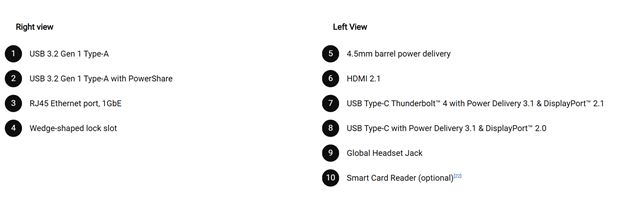
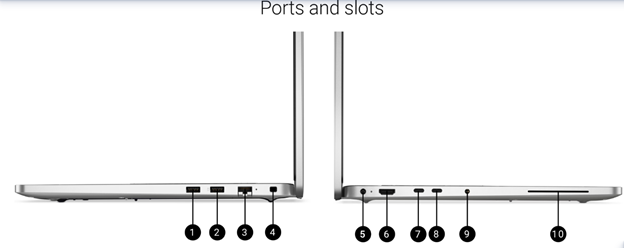
- Modern connectivity options including:
- Thunderbolt 4 (USB Type-C) for high-speed data transfer, docking, and charging.
- HDMI 2.1 for high-resolution external display support.
- RJ-45 port (Ethernet)
- Full HD (1080p) webcam with manual sliding privacy shutter.
- Optional IR camera for Windows Hello facial recognition (model dependent).
- Optional fingerprint reader integrated into the power button (model dependent).
- Supports ExpressCharge technology for rapid battery charging.
- Designed to minimize downtime and improve productivity.
- One-Finger Tap: Left-click
- Two-Finger Tap: Right-click
- Two-Finger Drag: Scroll vertically or horizontally
- Two-Finger Pinch: Zoom in or out
- Three-Finger Tap: Open Search
- Three-Finger Swipe Up: Open Task View (all open windows)
- Three-Finger Swipe Down: Show desktop
- Three-Finger Swipe Left / Right: Switch between open applications
- Four-Finger Swipe Left / Right: Switch between virtual desktops
- Fn + Esc: Toggle Fn Lock (switch between multimedia and standard function keys)
- Fn + F1: Mute / Unmute audio
- Fn + F2 / F3: Decrease / Increase volume
- Fn + F4: Microphone Mute
- Fn + F5: Keyboard backlight control
- Fn + F6 / F7: Decrease / Increase screen brightness
- Fn + F8: Switch to external display
- Fn + F10: Print Screen
- Fn + F12: End
Note: Keyboard characters may vary depending on the selected language, but shortcut key functions remain the same across all configurations.
Some keys include two symbols. Pressing the key alone types the lower symbol, while pressing Shift + the key types the upper symbol. For example:
Pressing 2 types 2
Pressing Shift + 2 types @
The F1–F12 keys on the top row serve as multimedia function keys, as indicated by the icons printed on them. Press the corresponding function key to perform the labeled action.
|
Function Key |
Primary Behavior |
|
F1 |
Mute or unmute audio |
|
F2 |
Decrease volume |
|
F3 |
Increase volume |
|
F4 |
Mute or unmute microphone |
|
F5 |
Keyboard backlight control |
|
F6 |
Decrease screen brightness |
|
F7 |
Increase screen brightness |
|
F8 |
Switch to external display |
|
F10 |
Print Screen |
|
F11 |
Home |
|
F12 |
End |


